Give online to your church
Giving from your phone takes about a minute, and there's no password to make. All you need is your church's giving link, your phone and a card. Your receipt comes by email, so there's nothing to keep track of.
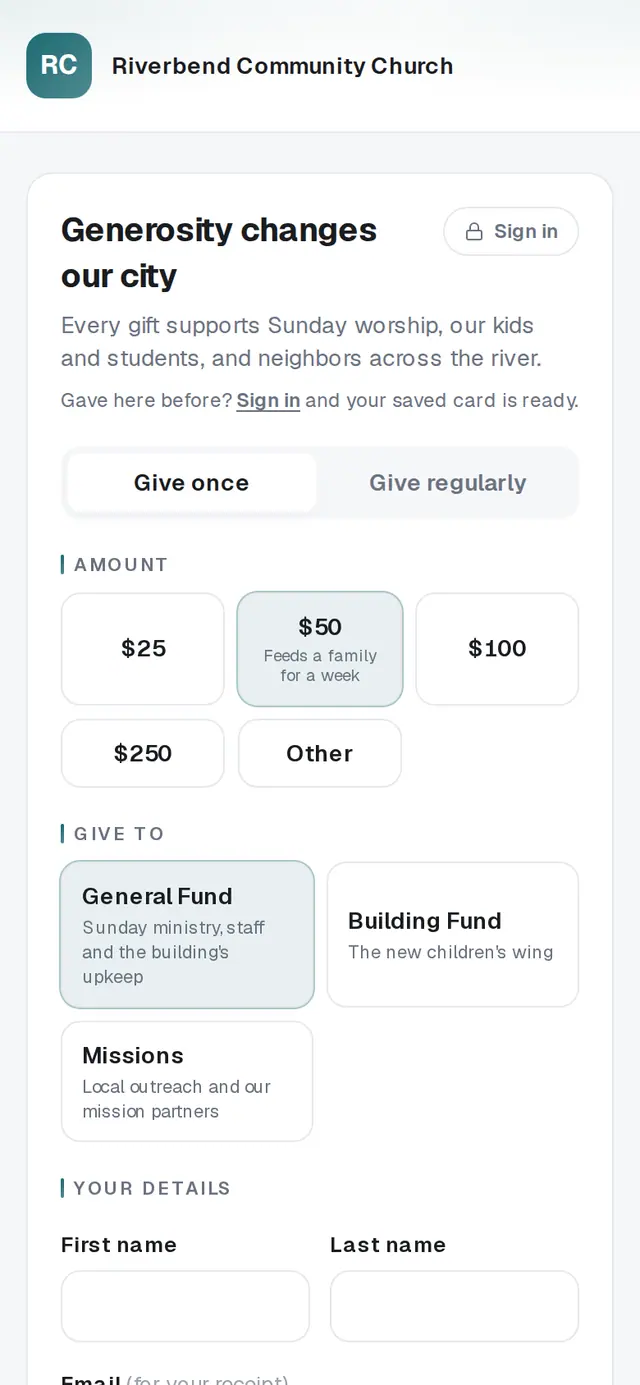
1/7 · Open your church's giving page
- 6Type the 6-digit code from the textMost phones fill it in for you. No text? Tap Email me a code instead, or Resend code after a moment.
Good to know
- Tick Give anonymously to keep your name off the church's staff screens. Your church still records the gift so you get your receipt.
- Want to add a line for the church, like “for the youth trip”? Tap + Add a note under your details.
- On your church's website, you choose your gift in the Give section and finish the code and card steps on your church's giving page. In your church's app, you choose your gift in the app and finish the card step in your phone's browser.
- On a tablet in the church lobby, the page works the same way: the code goes to your own phone, and a countdown clears the page shortly after you give, so the next person starts fresh.
If it’s not working
It says “Please enter an amount of at least …”
Your church sets the smallest gift its page takes. Raise the amount and tap Continue again.
It says online gifts can be up to $50,000
That's the most one online gift can be. To give more, contact your church directly; they can help with a larger gift.
It says “That payment was declined.”
Your card's bank turned the payment down, and nothing was charged. The message under the button gives the bank's reason. Check the card details, try another card, or call the number on the back of your card.
I lost my connection right after tapping Give
If you see “We couldn't confirm your gift”, check your connection and tap Give again. The page recognizes the same gift, so you won't be charged twice.
It says “This page isn't accepting gifts right now.”
Your church has paused its giving page. Reach out to your church for another way to give.
Next, you might want to
- Set up a monthly giftGive on repeat (weekly, monthly, every three months or yearly), starting today or on a date you pick.
- Sign in to give faster next timeSign in with a code so your details and saved card are ready, and sign out on a shared phone or computer.
- Download your giving statement for taxesOpen Your giving, pick a year, and print or save the statement your tax preparer asks for.
- Give with a text messageText your church's keyword, reply with an amount, finish on the giving page the first time, and answer YES after that.